
Overview
Tax registrations tell Nocotax where your organization is registered to collect and remit taxes (VAT, GST, sales tax, etc.). This configuration is critical for:- Accurate tax calculations on invoices based on your registration status
- Compliance with local tax regulations
- Input tax recovery on purchases where you’re registered
- Proper tax reporting across jurisdictions
When to configure tax registrations
You should configure your tax registrations:- During initial onboarding when setting up your Nocotax account
- When you register in a new jurisdiction
- When your registration type changes (e.g., moving from standard to OSS registration)
- When updating registration numbers or details
How to configure tax registrations
During onboarding
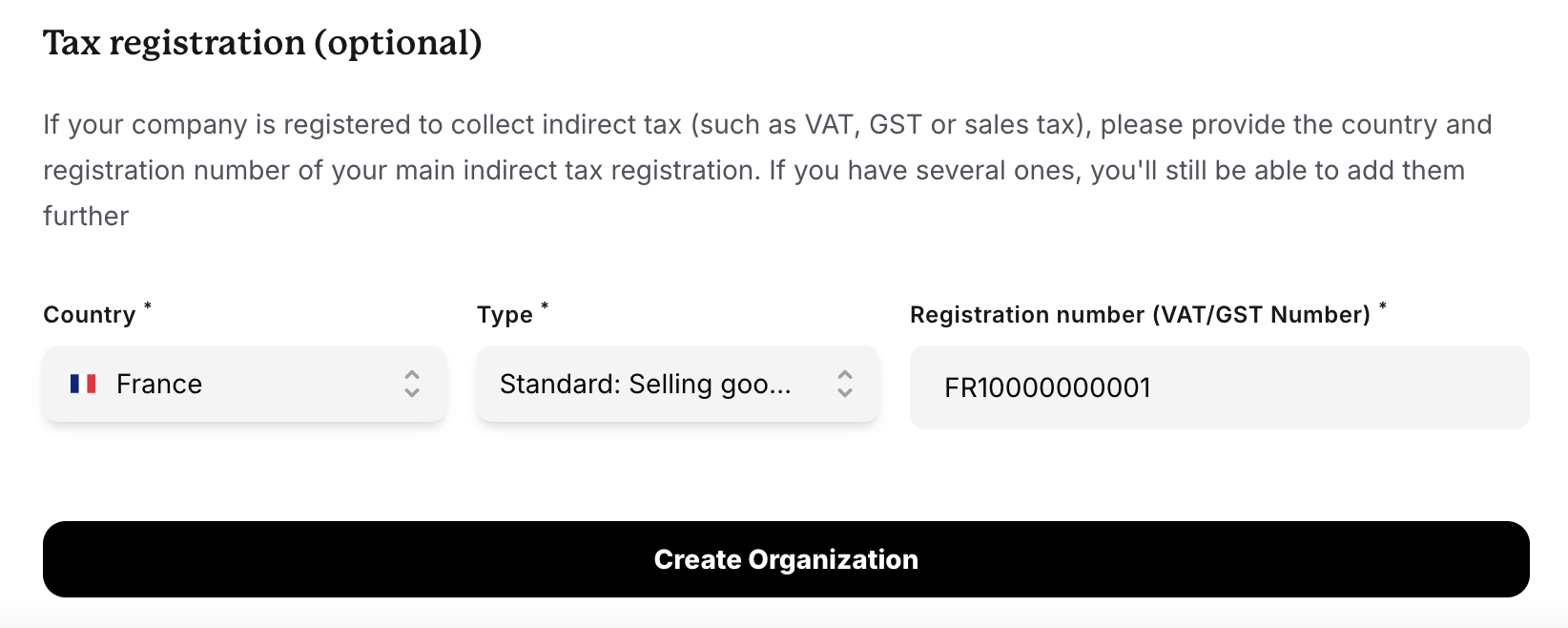
When you first set up your Nocotax account, you’ll be prompted to add your tax registrations:- Navigate to the onboarding flow
- Select the countries where you’re tax registered
- Choose the registration type (if applicable)
- Enter your tax registration number (VAT ID, GST number, etc.)
- Save your configuration
After onboarding
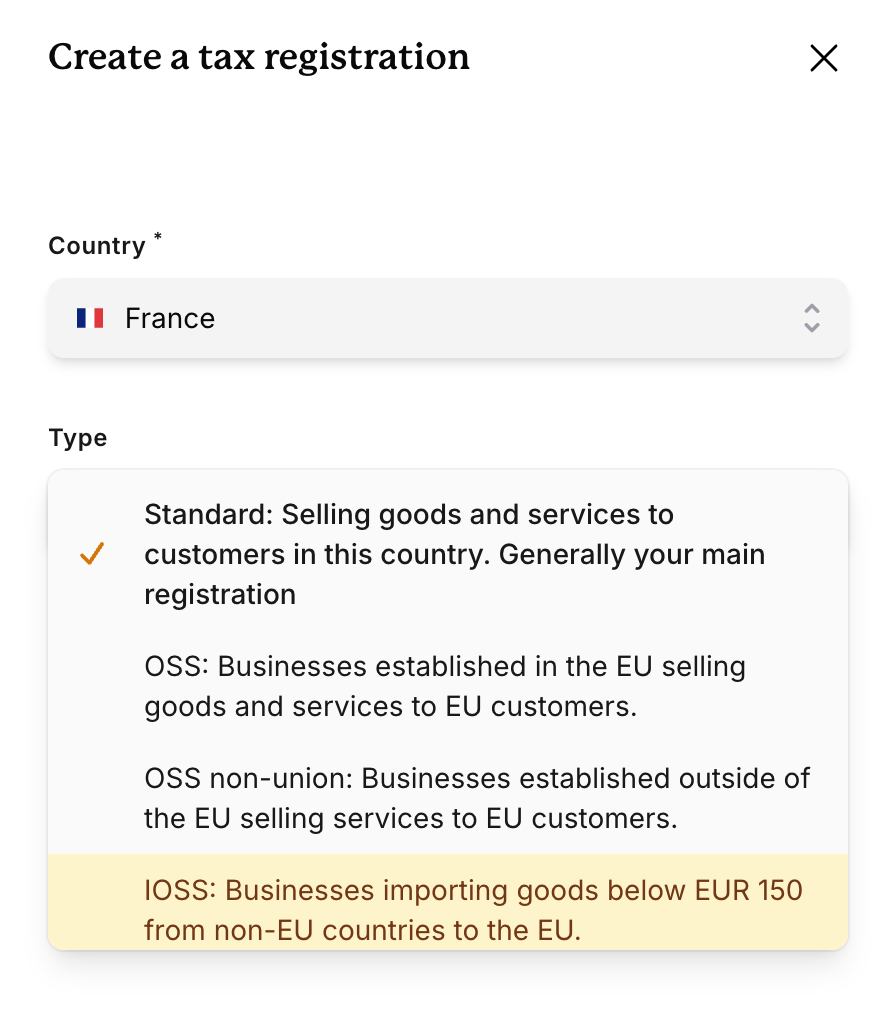
You can update your tax registrations anytime:- Go to Profile Settings → **Organization **→ Tax Registrations
- Click Add Tax Registration
- Select the country / jurisdiction
- Choose the appropriate registration type
- Enter your registration details
- Save changes
Changes to tax registrations take effect immediately for new invoices only. Existing draft invoices may need to be recreated.
Registration components
Each tax registration consists of:Country/Jurisdiction
The country or region where you’re registered. This determines which tax rules apply to your transactions.Tax Registration Number
Your official tax identification number:- EU countries: VAT number (e.g., DE123456789)
- UK: VAT registration number
- Australia: ABN (Australian Business Number)
- Canada: GST/HST registration number
- US: Sales tax permit numbers (varies by state)
Registration Type
Some jurisdictions require you to specify the type of registration. This is particularly important in the EU (see below).EU tax registration types
Tax registration types per country
Common scenarios
Scenario 1: EU business selling B2C across Europe
Scenario 1: EU business selling B2C across Europe
Situation: You’re a German company selling software subscriptions to consumers across the EU. You have €50,000 in annual EU sales.Configuration:
- Germany: Standard registration (your home country)
- EU-wide: OSS for EU registration (for sales to other EU countries)
Scenario 2: Non-EU business selling digital services
Scenario 2: Non-EU business selling digital services
Situation: You’re a Canadian SaaS company with customers in France, Netherlands, and Sweden.Configuration:
- EU: OSS for Non-EU registration (register in one convenient EU country)
Scenario 3: E-commerce marketplace shipping from China
Scenario 3: E-commerce marketplace shipping from China
Situation: You operate a marketplace shipping low-value goods from China to EU consumers.Configuration:
- EU: IOSS registration
Scenario 4: Small EU seller under threshold
Scenario 4: Small EU seller under threshold
Situation: You’re a Spanish business selling handmade goods online. You have €8,000 in annual sales to other EU countries.Configuration:
- Spain: Standard registration only
Impact on tax calculations
Your tax registrations directly affect how Nocotax calculates tax:For Sales Invoices (B2C)
- With registration in customer country: Charge local VAT rate
- With OSS registration: Charge destination country VAT rate
- No registration in customer country: May need to charge your home country rate (depends on thresholds)
For Sales Invoices (B2B)
- Customer has valid VAT number: Typically reverse charge (0% VAT)
- Customer has no VAT number: Treated as B2C
For Purchase Invoices
- Registered in supplier country: Can claim input VAT
- Not registered: Cannot claim input VAT in that country
Nocotax automatically determines the correct tax treatment based on your registrations, the customer’s location, and the transaction type.
Validation and compliance
Nocotax validates tax registration numbers:- EU VAT numbers: Checked against VIES (VAT Information Exchange System)
- Format validation: Ensures numbers match country-specific formats
- Warning indicators: Flags potentially invalid numbers
- A tax number format is incorrect
- A VAT number cannot be verified in VIES
- Registration details are missing for required jurisdictions
Frequently Asked Questions
What is the EU small seller scheme?
What is the EU small seller scheme?
The EU small seller scheme (also called the distance selling threshold) allows businesses with less than €10,000 in annual cross-border B2C sales within the EU to charge their home country VAT rate on all EU sales.How to configure in Nocotax:
- Add only your local country’s standard registration
- Do NOT add OSS for EU registration
- Nocotax will apply your home country VAT rate to all EU B2C sales
Can I have multiple registration types in the same country?
Can I have multiple registration types in the same country?
Yes. For example, you can both have a standard registration and an OSS registration in Germany.
What happens if I sell to a country where I'm not registered?
What happens if I sell to a country where I'm not registered?
The tax treatment depends on several factors:
- B2B sales: Typically reverse charge applies (customer accounts for VAT)
- B2C sales: You may need to charge your home country rate or register for VAT
- OSS users: Can charge destination country rates without local registration
How do I know which registration type to choose?
How do I know which registration type to choose?
Key decision points:
- Are you based in the EU?
- Yes → Use Standard for home country, consider OSS for EU for other countries
- No → Use OSS for Non-EU
- What are you selling?
- Digital services/software → OSS (EU or Non-EU)
- Low-value imported goods (≤€150) → IOSS
- High-value or local goods → Standard registrations
- What’s your annual EU B2C sales volume?
- Under €10,000 → Can use home country standard only
- Over €10,000 → Need OSS or multiple standard registrations
Can I change my registration type after setting it up?
Can I change my registration type after setting it up?
Yes, you can update your registrations at any time. If you need to update the type of registration, you’ll need to recreate a new registration, as only the tax registration number for a given registration can be updated.
Do I need to configure registrations for countries where I only make purchases?
Do I need to configure registrations for countries where I only make purchases?
It depends:
- If you’re registered for VAT in that country and want to claim input tax → Yes, add the registration
- If you’re not registered there → No need to add it
Best practices
Keep registration numbers up to date
Keep registration numbers up to date
Always update your registration numbers in Nocotax immediately when they change. Incorrect numbers on invoices can cause compliance issues and delays in customer payments.
Review registrations quarterly
Review registrations quarterly
Set a reminder to review your tax registrations every quarter. This ensures you’re registered in all required jurisdictions and using the correct registration types as your business grows.
Document registration dates
Document registration dates
Keep records of when each registration became effective. This helps with historical reporting and ensures you apply the correct tax treatment for different time periods.
Monitor sales thresholds
Monitor sales thresholds
Track your sales volumes in different jurisdictions. Set up alerts when you’re approaching registration thresholds so you can register before you’re legally required to.
Test in testmode first
Test in testmode first
When adding new registrations or changing types, test the tax calculation behavior in testmode before applying changes to your livemode environment.