
Overview
Nocotax supports multiple platform business models, allowing you to configure how your platform handles transactions between buyers, sellers and your platform. You can select one or both models depending on your business needs:- Commission Agent: Your platform facilitates transactions and earns commissions
- Buy and Resell (Undisclosed Agent): Your platform purchases goods/services and resells them
Platform models explained
Commission Agent
In the commission agent model, your platform acts as an intermediary between buyers and sellers. You facilitate transactions but don’t take ownership of the goods or services. How it works:- Sellers list products/services on your platform
- Customers purchase from sellers through your platform
- You earn a commission on each transaction
- The seller remains the merchant of record (transparent model)
- ✓ You take commissions upon sales and bill sellers periodically or at every sale
- ✓ You can invoice customers on behalf of sellers (if enabled)
- Ideal for: Marketplaces, booking platforms, service aggregators
Buy and Resell
In the buy and resell model (also known as undisclosed agent), your platform purchases goods or services from suppliers and resells them to customers under your own name. The customer sees only your platform as the seller, not the original supplier. How it works:- You purchase inventory or services from suppliers
- You set your own prices and markup
- You invoice customers directly as the seller
- Suppliers invoice you (or you use self-billing)
- ✓ Total price and margin control
- ✓ You directly invoice the buyer
- ✓ You are billed by suppliers, but can automate through self-billing
- Ideal for: E-commerce platforms, wholesale resellers, fulfillment services
Handling complex product relationships
The buy and resell model doesn’t require a one-to-one match between what you purchase and what you sell. Your platform can handle various product relationship scenarios: One-to-many: You purchase one item from a supplier and split it into multiple products sold separately.- Example: Buy wholesale fabric by the roll, sell it by the yard to multiple customers
- Example: Purchase components from various suppliers and assemble them into a complete product kit
- Example: Buy a laptop, mouse, and bag from different suppliers and sell them as a “productivity bundle”
- Example: Buy electronics, add warranty services and configuration, then sell as a package
- Create purchase invoices for each supplier transaction
- Create sales invoices that may not directly correspond to a single purchase
- Track costs and revenue independently
- Calculate margins accurately across complex product relationships
You can enable both models simultaneously if your platform operates in multiple ways. For instance, some products might be sold on commission while others are purchased and resold.
Configuration process
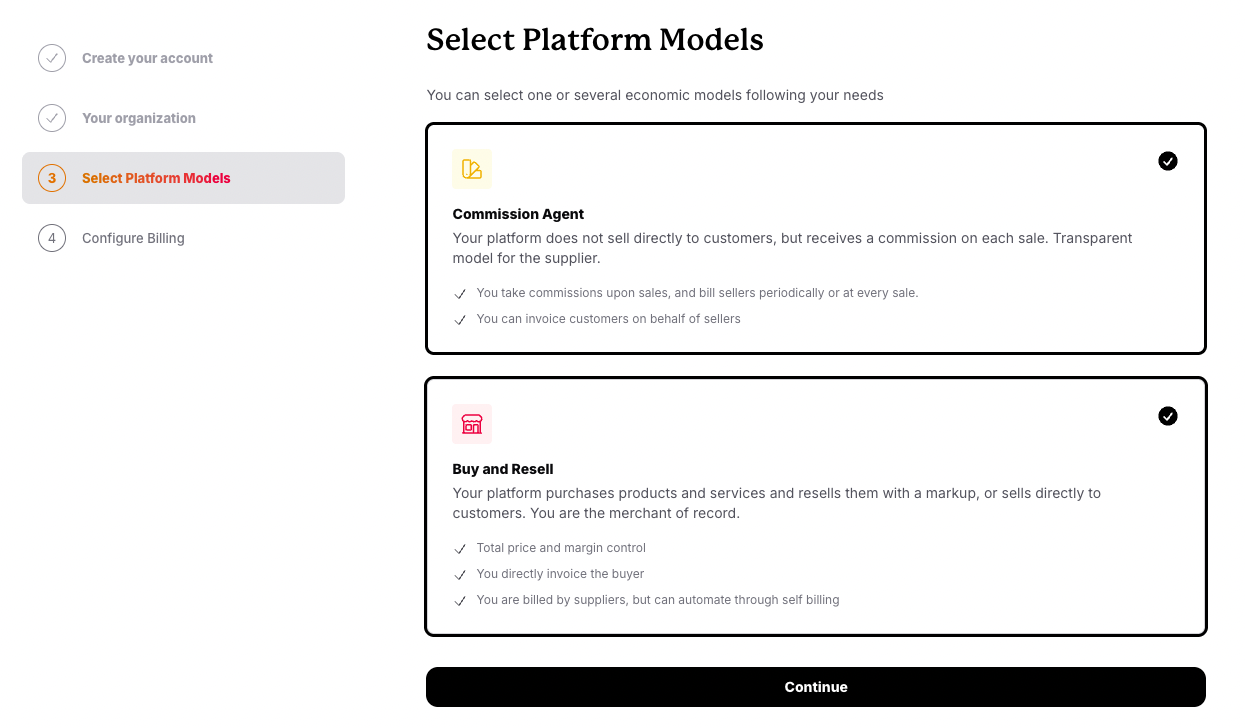
Setting up your platform models is a two-step process during onboarding:Step 1: Select platform models
Choose which economic model(s) your platform uses. During onboarding:- Navigate to Select Platform Models (step 3 of onboarding)
- Review the available models and their descriptions
- Select Commission Agent, Buy and Resell, or both
- Click Continue to proceed to configuration
1
Navigate to Select Platform Models (step 3 of onboarding)
2
Review the available models and their descriptions
3
Select Commission Agent, Buy and Resell, or both
4
Click Continue to proceed to configuration
Step 2: Configure billing settings
Once you’ve selected your platform model(s), configure how invoicing works for each model.Commission Agent configuration
Configure how and when you invoice sellers for commissions earned.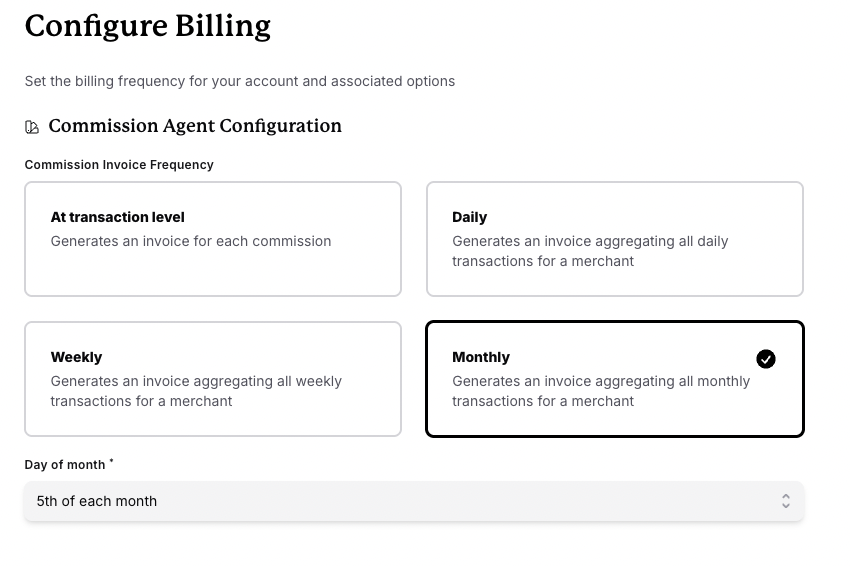
Commission invoice frequency
Choose how often you want to generate invoices for commissions:Monthly invoice settings
If you select Monthly frequency, you’ll need to specify: Day of month: Choose which day invoices are generated (1st-28th of each month). Common choices:- 1st: Invoice at the start of the month for previous month’s activity
- 5th: Allow time for transaction disputes/refunds before invoicing
- 15th: Mid-month invoicing for better cash flow distribution
Buy and Resell configuration
Configure how you handle purchase invoices from suppliers (self-billing).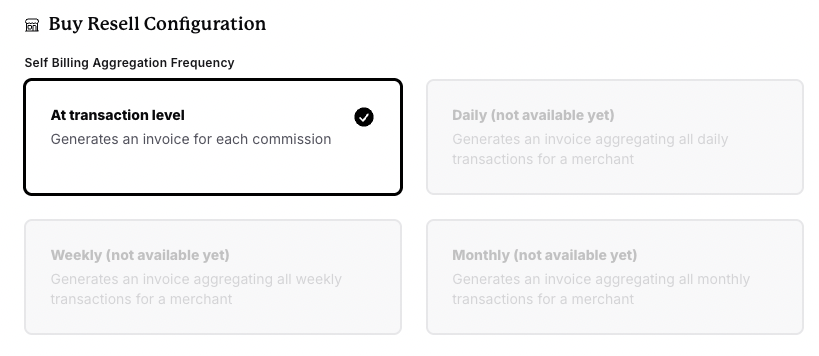
Self-billing aggregation frequency
Choose how often you want to generate purchase invoices for supplier payouts:Currently, only at transaction level is available for buy and resell self-billing. Aggregated frequencies (daily, weekly, monthly) are coming soon.
Combining both models
If your platform operates using both models, you can enable them simultaneously:Example: Hybrid marketplace
Scenario: Your platform sells some products on commission (from third-party sellers) and also stocks and resells other products directly. Configuration:- Enable both Commission Agent and Buy and Resell models
- Configure commission invoicing for marketplace sellers (e.g., monthly)
- Configure self-billing for direct purchases (e.g., transaction level)
How invoicing works with each model
Commission Agent invoicing flow
- Customer purchases from a seller through your platform
- Transaction completes and commission is calculated. Sync the commission to Nocotax through API.
- At the configured frequency (daily, weekly, monthly, or per transaction):
- Nocotax generates a commission invoice
- Invoice shows commission owed by the seller to your platform
- Invoice is marked with
flow=commissions, and finalized
Buy and Resell invoicing flow
Customer invoicing (sales)
- Customer purchases from your platform
- Immediately or at your discretion:
- You create a sales invoice
- Invoice shows amount owed by customer to your platform
- Invoice is marked with
flow=sales
- You finalize and record payment
Supplier billing (purchases)
- You purchase or facilitate a sale that requires supplier payout
- At the configured frequency (currently transaction level):
- You generate a self-billed purchase invoice
- Invoice shows amount owed to the supplier by your platform
- Invoice is marked with
flow=purchases
- You finalize and pay the supplier
Best practices
Choose frequency based on transaction volume
Choose frequency based on transaction volume
High-volume platforms benefit from less frequent invoicing (weekly/monthly) to reduce administrative overhead. Low-volume platforms or those with high-value transactions may prefer transaction-level invoicing for immediate visibility.
Align invoice dates with payout schedules
Align invoice dates with payout schedules
If you select monthly invoicing, choose a day of month that aligns with when you actually pay sellers or suppliers. This creates a consistent, predictable cash flow cycle.
Test in testmode first
Test in testmode first
Before going live, test your platform model configuration in testmode. Create sample transactions and review the generated invoices to ensure they match your expectations.
Document your model for sellers/suppliers
Document your model for sellers/suppliers
Clearly communicate to sellers and suppliers which model you’re using and when they can expect invoices. This reduces confusion and support requests.
Common scenarios
Scenario 1: New marketplace starting out
Situation: You’re launching a marketplace with a few sellers and low transaction volume. Recommended configuration:- Model: Commission Agent
- Frequency: At transaction level or Weekly
- Reasoning: Low volume means administrative overhead is manageable, and immediate invoicing provides clear visibility
Scenario 2: Established e-commerce platform
Situation: You’ve been operating for years with hundreds of suppliers and thousands of daily orders. Recommended configuration:- Model: Buy and Resell
- Frequency: Monthly (when available; currently transaction level)
- Reasoning: High volume requires aggregation to reduce invoice count and simplify reconciliation
Scenario 3: Hybrid marketplace
Situation: You have both third-party sellers (commission-based) and your own inventory (buy/resell). Recommended configuration:- Models: Commission Agent + Buy and Resell
- Commission frequency: Monthly (for third-party sellers)
- Self-billing frequency: Transaction level (for inventory purchases)
- Reasoning: Each model operates independently with its own optimal frequency
Scenario 4: Service booking platform
Situation: You connect customers with service providers (hotels, tours, activities) and earn a commission. Recommended configuration:- Model: Commission Agent
- Frequency: Monthly with invoicing on the 5th
- Reasoning: Services may have cancellations/refunds, so waiting until the 5th allows time for adjustments before invoicing